I didn't set out to "ric" my desktop. I set out to stop being angry at it.
For years my daily driver was Windows, and the specific thing that broke me wasn't one big failure — it was the accumulation of small ones. An update deciding it was time right now, mid-task. A background process I never asked for, quietly holding onto CPU and RAM I could see but not reclaim. A settings menu that changes shape every eighteen months and still can't do the one thing I actually want — move a window with a keystroke, or make my terminal see-through, or just know what's using my memory without opening three different tools. I wanted a machine that did what I told it, nothing it didn't, and that I could see through end to end. That's not really something Windows is built to offer. Linux is.
This post is the build story: why CachyOS, why Hyprland, what's actually running under the hood, and — since "fast" is a claim you should be able to check, not just assert — the real resource numbers I pulled while writing this.
Why CachyOS, Specifically
I didn't want a Linux distro. I wanted one that treated performance as a first-class goal rather than an afterthought you bolt on later. CachyOS is an Arch-based distribution built around exactly that: it ships with the BORE CPU scheduler, x86-64-v3/v4 optimized package repos compiled for modern CPUs instead of the lowest common denominator, and sane defaults out of the box — while still being real Arch underneath, so pacman, the AUR, and the entire Arch documentation ecosystem all just work.
That last part matters more than it sounds. A lot of "fast" distros get there by stripping things out and leaving you to rebuild your own toolchain from zero. CachyOS gets there by tuning what's already there, which meant I spent my time customizing my desktop, not fighting my package manager.
Why Hyprland
Once the base OS was decided, the window manager question came down to one thing: I wanted a tiling, keyboard-driven, Wayland-native compositor with GPU-accelerated animations and blur that doesn't cost real performance to run — because a compositor's whole job is to sit between you and every pixel on screen, so if it's slow, everything is slow.
Hyprland fit that exactly. It's Wayland-native (no X11 compatibility tax), animates and blurs on the GPU, and — the part that made it worth the setup time — is entirely configurable in plain text. On this particular CachyOS build it's configured through a Lua layer instead of the usual hyprland.conf, which meant every keybind, window rule, and blur setting in this build is real, readable, testable code, not a wall of bind = SUPER, X, exec, Y lines. Workspace switching, window resizing, session controls — all of it lives in version-controllable Lua files I can actually reason about.
The Shell: Noctalia
Hyprland gives you a compositor, not a desktop. The bar, the control center, the launcher, the notification system — all of that is a separate layer, and this is where Noctalia comes in: a modern, QuickShell-based shell built specifically for Hyprland.
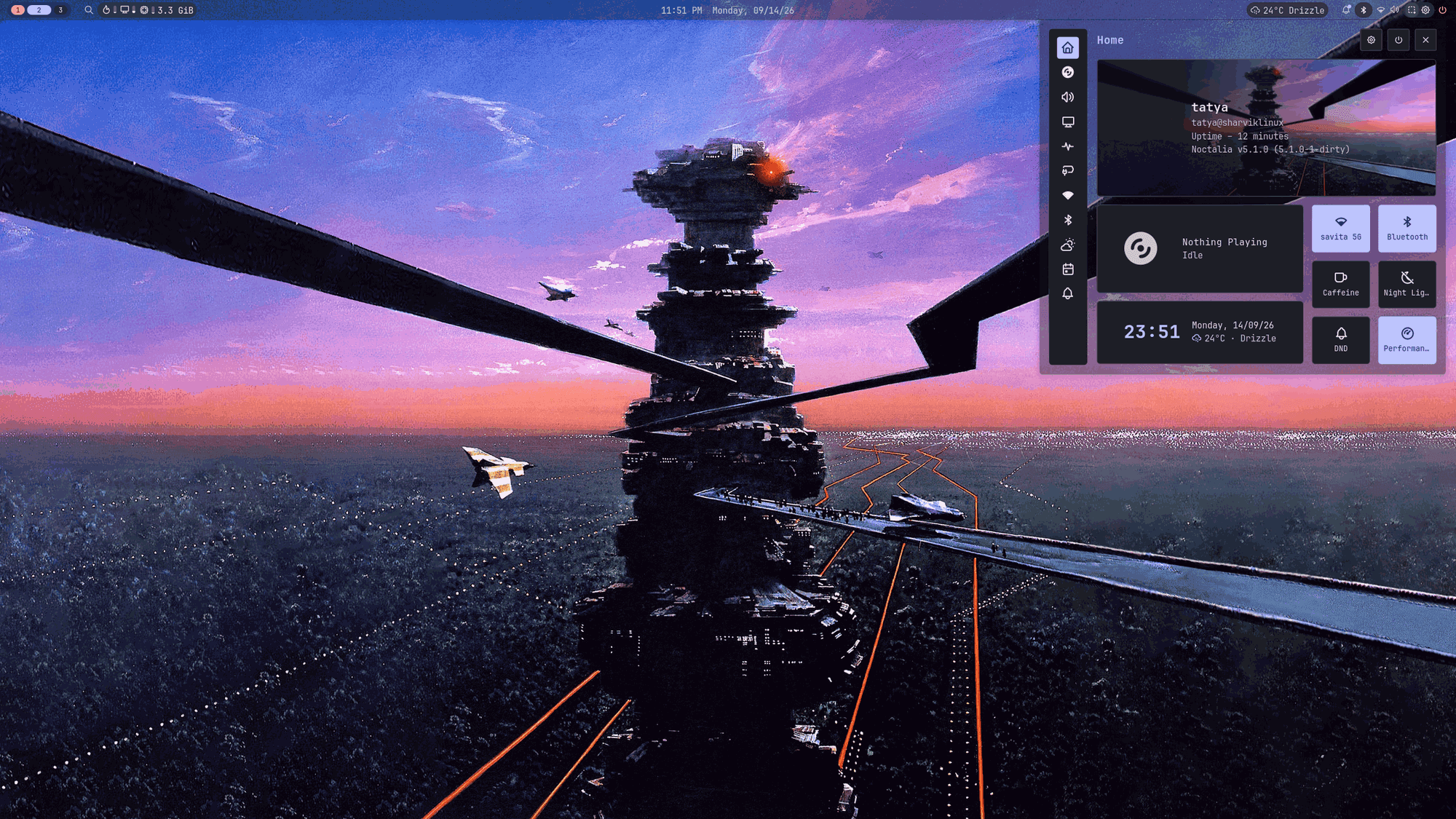
That's Super+X — one keystroke, and every system control I actually reach for daily is right there: Wi-Fi, Bluetooth, a caffeine toggle so my screen doesn't sleep mid-download, night light, do-not-disturb, a live weather readout, media controls, and a performance-profile switch, all in one translucent panel that matches the wallpaper behind it instead of sitting on top of it like a foreign object. No hunting through a settings app with six nested menus. No mouse required to get here at all — I never once open this by clicking.
The bar itself (top of that same screenshot) is entirely custom: workspace indicators pinned to the far left and numbered instead of unlabeled dots, the clock dead-centered showing 12-hour time, live temp/GPU/RAM stats, weather for my actual city, and a background opacity low enough that the compositor's blur genuinely shows through — not just a bar sitting on top of the desktop, but part of it.
One Palette, Every App
This is the part that actually changes how the desktop feels, not just how it looks: Noctalia generates a color palette live from the current wallpaper — Material You style — and that single palette cascades automatically into everything else I use: GTK and Qt apps, the terminal, the app launcher, the icon theme, even Neovim and Firefox.
Practically, that means when I change my wallpaper, I'm not opening five different settings panels to keep everything matching. One change, and:
| Surface | What picks up the new palette |
|---|---|
| Terminal | kitty and Alacritty color schemes regenerate automatically |
| App launcher | rofi re-themes to match, replacing the default Super+Space launcher |
| File manager | Nautilus + Papirus icon set (with folder colors tinted to the palette) |
| Neovim | A generated base16 colorscheme, wired into LazyVim's own theme loader |
| Firefox | Synced live through Pywalfox, a native-messaging bridge straight into the browser |
| System font | JetBrains Mono Nerd Font, set consistently across the bar, terminal, and GTK apps |
| Cursor | A cohesive cursor theme, applied at the compositor level so it survives reboots |
None of this is a background daemon constantly polling and repainting things. It's a template system that fires once, on a theme change, writes the right config files for each app, and gets out of the way.
The Daily Driver: Terminal-First, Verified Fast
Here's where "fast" stops being a vibe and starts being something I can show. This is fastfetch and btop side by side, with LazyVim underneath — my actual system, mid-session, doing nothing special:
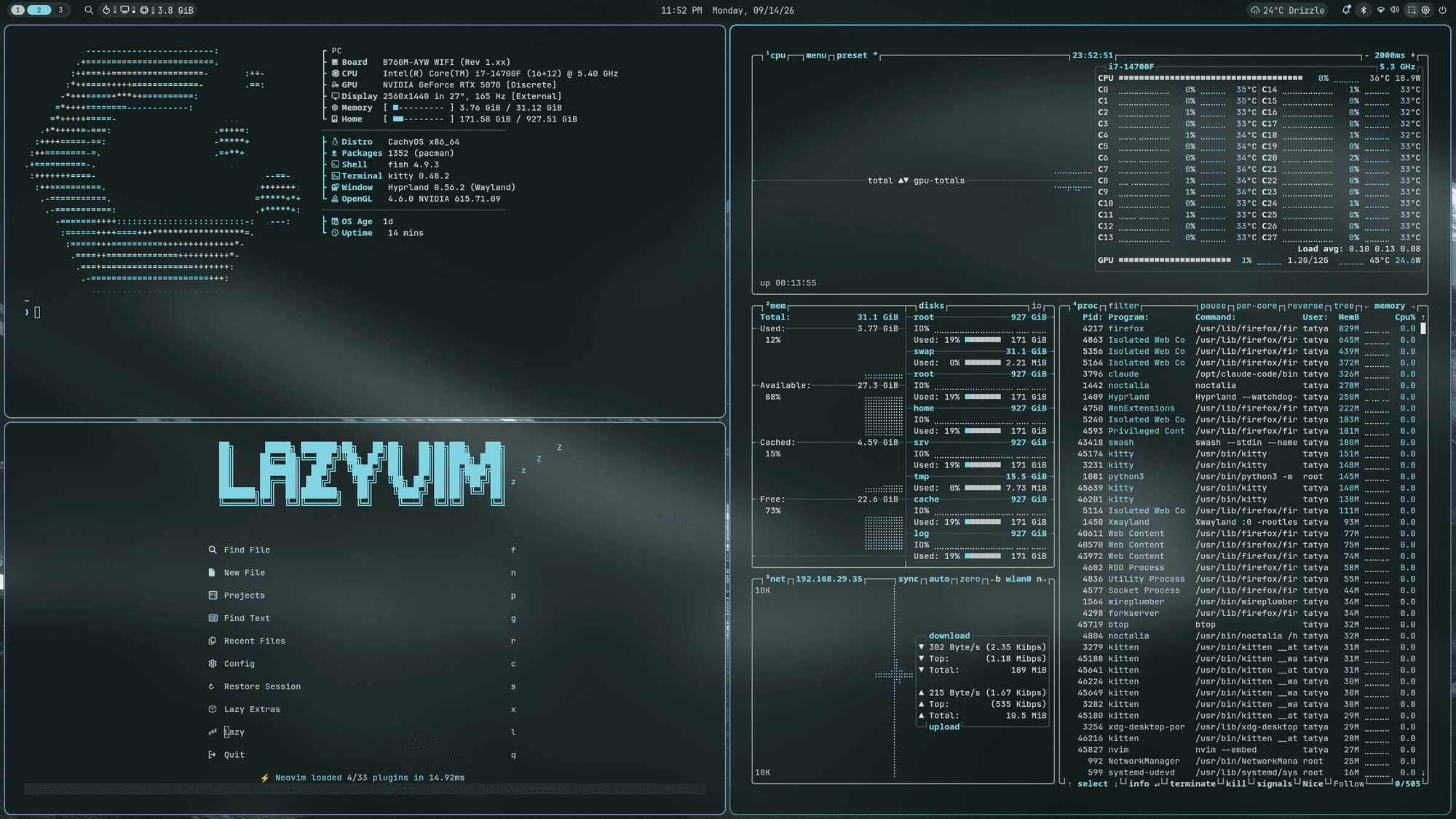
A few things worth pointing at in that screenshot:
- fastfetch isn't the default flat list — it's hand-structured into PC / Distro-Software / Network sections, color-coded, with real icons. It used to include a public-IP lookup that made every new terminal pause on a network round-trip; cutting that took it from ~266ms to ~76ms. A system-info tool that makes you wait is the kind of bloat I was trying to get away from — so it doesn't, anymore.
- btop, top-right, shows exactly what CPU/GPU/memory pressure this whole setup costs at idle: single-digit percent across the board. The compositor's blur, the translucent bar, the live weather widget — none of it registers.
- LazyVim, bottom-left, isn't running its default
tokyonighttheme. It's running the same generated base16 palette as everything else, with a transparency pass that strips the background off every floating panel and popup so the terminal's own translucency shows straight through the editor — LSP hovers, notifications, the completion menu, all of it.
The honest resource math: measured on this exact machine, the entire shell (Noctalia) sits around 300MB resident and a fraction of a percent CPU at idle. Nothing in this whole stack runs as a persistent background daemon that isn't already part of the base desktop — rofi, Nautilus, and fastfetch all launch on demand and exit immediately after. The only genuinely new always-on process the whole build added is a 32MB helper that bridges Firefox to the color sync, and it only exists while Firefox itself is open. On a system with 32GB of RAM, the entire customization footprint doesn't even round up to something worth worrying about.
The Workflow: Everything, Keyboard-Only
The actual daily-driver test of a setup like this isn't how it looks in a screenshot — it's whether you can do real work without reaching for a mouse. This is a normal working session: lazygit on the left, a yazi file browser and a Python REPL on the right, all inside the terminal:
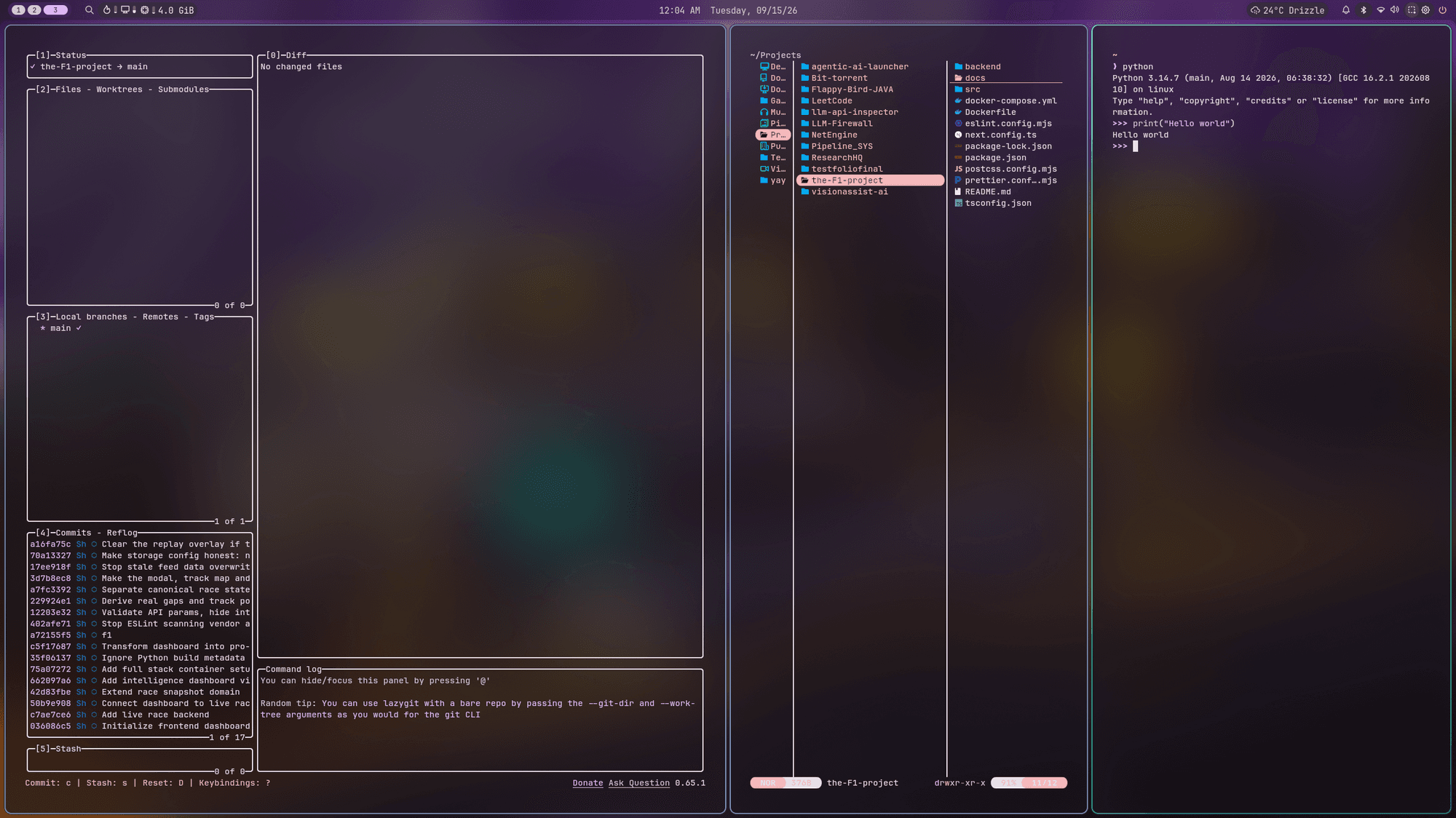
lazygit turns git into something I can actually see — status, diff, branches, commit log, all live-updating panels instead of memorized command flags. yazi is a terminal file manager fast enough that it never feels like a detour from the shell. Both of them, like the rest of this build, respect the same color palette as everything else, so switching between "browsing files" and "editing code" and "reading a diff" doesn't involve a jarring theme change every time a new window opens.
None of this happens by clicking. Custom Hyprland keybinds handle the rest: Super + a number switches workspaces directly (they're numbered on the bar to match), Super+Shift + a number sends the focused window to that workspace, Super =/- grows and shrinks the active window live, and Super+Shift+Q drops straight into the session menu for lock/logout/reboot/shutdown. Every one of those was a genuine keybind bug I had to chase down and fix along the way — this fork of Hyprland evaluates its own dispatch syntax as Lua rather than the classic dispatcher string format, which meant the "obvious" way to wire up a resize command silently did nothing until I found the actual native call it expected.
Why This Actually Matters to Me
None of this was really about aesthetics, even though it looks good. It was about closing the gap between "the computer is doing something" and "I know what and why." Every piece of this setup is a text file I can read, a template I can trace, a process I can ps and see the actual cost of. When something is slow, I can find out why instead of guessing. When I want something to look or behave differently, I edit a file instead of hoping a settings toggle exists for it somewhere.
That's the whole trade I made leaving Windows: I gave up the safety of "someone else decided how this works" and got back a machine that does exactly what I tell it, costs exactly what I can measure, and never once updates itself without asking.
The stack, if you want to build your own version of this:
| Layer | Tool |
|---|---|
| Distro | CachyOS (Arch-based, performance-tuned) |
| Compositor | Hyprland (Lua-configured fork) |
| Shell / bar / panels | Noctalia (QuickShell-based) |
| Launcher | rofi |
| File manager (GUI) | Nautilus + Papirus icons |
| File manager (terminal) | yazi |
| Terminal | kitty + Alacritty, JetBrains Mono Nerd Font |
| Editor | Neovim (LazyVim), base16 theme generated live |
| Git | lazygit |
| System monitor | btop |
| System info | fastfetch, hand-structured config |
| Browser theming | Firefox + Pywalfox |
| Icons / cursor | Papirus, synced cursor theme |
If you're still on Windows and the small stuff is wearing you down the same way it wore me down — it's not actually that far away. It's just a different set of tools, and none of them are mysterious once you've opened the config file.